

Image to Video AI is easiest to appreciate when you treat it as a layer added to existing creative work rather than as a total creative replacement. There is a common temptation to evaluate every new media tool as if it must compete with full production workflows, traditional editing systems, or highly controlled animation pipelines. That is often the wrong standard. A better question is simpler: what kind of work does this platform remove, and what kind of work does it leave to the user?
From that perspective, the answer becomes clearer. The platform removes much of the labor involved in converting a still image into a short moving clip. It does not remove the need for visual judgment, subject selection, taste, or decision-making. Instead, it occupies a middle position between static asset creation and fully manual video production. In my view, that middle position is exactly why tools like this are becoming relevant.
Why Layered Workflows Are Becoming More Common
Creative work is increasingly modular. A single visual asset may appear as a static post, landing-page image, ad variation, presentation slide, or short motion teaser. Tools that fit into this modularity have an advantage because they do not force creators to choose one medium too early.
Creators No Longer Work in One Final Format
An image used today may need to serve several roles tomorrow. It may start as concept art, then become a social post, then a short promo clip, then a background element in a launch deck. This means the most useful tools are often not the ones that create everything from scratch, but the ones that help assets travel between formats.
Motion Can Be an Added Layer, Not a New Project
This is where the platform’s structure matters. By starting with a still image, it implies that motion can be something applied to an already-meaningful visual. That lowers the psychological and operational cost of making video because the user is not starting over.
This Supports Real Creative Momentum
One of the biggest hidden costs in content work is context switching. When a creator has to leave an image workflow, open an entirely different production mindset, and construct motion from zero, many worthwhile ideas simply do not get made. A layered tool reduces that interruption.
How the Official Workflow Supports Layered Creation
The workflow shown on the public pages is short, and that brevity is central to how the product fits into modular production.
The Upload Step Preserves the Original Asset
The process begins with uploading a supported image such as JPEG or PNG. This is more important than it seems. It means the original asset remains the creative anchor. The user is not abandoning prior work. They are building on top of it.
The Prompt Adds Behavior Without Replacing Identity
After upload, the user describes how the still image should move through Image to Video. That prompt does not replace the image’s identity. It adds behavior to it. This is a subtle but important distinction. The visual still carries the composition, subject, color, and atmosphere established in the source image. Image to Video introduces motion and temporal character.
Behavior Is What Makes the Layer Feel Alive
An image can already communicate mood statically. Motion changes how that mood unfolds over time. A subtle camera drift suggests something different from sudden energetic movement. The platform gives the user a way to define that behavioral layer through language.
Settings Help the Layer Fit the Destination
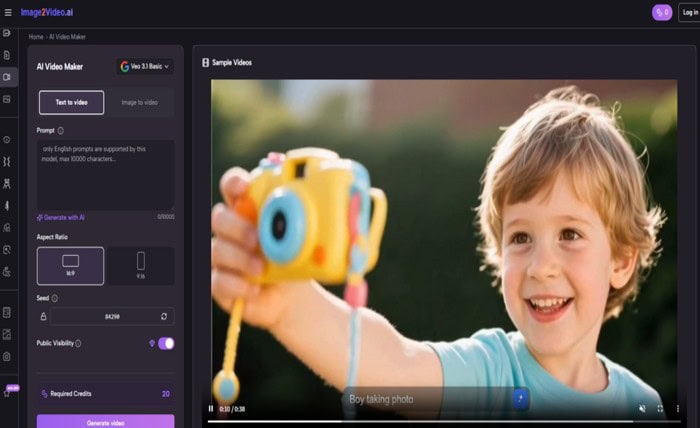
The visible controls, including aspect ratio, video length, resolution, frame rate, seed, and visibility, make the motion layer more functional. A layer only becomes useful when it fits the destination where it will be shown.
A widescreen ratio may support presentation use. A vertical ratio may support platform-native distribution. Resolution influences perceived polish. Frame rate affects feel. These settings help the creator match the generated layer to the environment where it will live.
What the Platform’s Real Role May Be
The product is often easier to misread if it is judged only by its most eye-catching examples. Its more durable value may lie elsewhere.
It Helps Existing Visuals Become More Flexible
Many teams and creators already have strong image libraries. What they often lack is the time or skill bandwidth to convert those assets into motion-based materials. The platform appears built to solve that specific friction point.
It Reduces the Cost of Format Expansion
When one image can quickly become a short clip, a creator can test additional channels or placements without committing to a full production effort. This changes the economics of experimentation.
Flexibility Is Often More Valuable Than Perfection
In many real workflows, a very good short clip produced quickly is more valuable than a theoretically perfect video that requires far more time and expertise to create. The platform seems designed for that practical tradeoff.
How the Official Process Works as a Production Layer
The public-facing process can be read as a sequence of layering decisions rather than as a one-shot magic trick.
Step One: Bring in the Base Image
The base image establishes the source identity of the output. This makes the workflow especially relevant for creators who already have approved visuals or personally meaningful photos.
Step Two: Define the Motion Layer With a Prompt
The prompt tells the system what kind of movement to add. This may involve camera feel, scene energy, or subtle atmospheric motion. The user is not editing every detail manually, but they are guiding the behavioral direction.
Step T hree: Shape the Layer Through Settings
Settings such as aspect ratio and resolution decide how the resulting layer behaves in practical use. They are the bridge between creative intent and deployment.
Step Four: Generate and Evaluate the Result
Once the output appears, the creator can decide whether the motion layer enhances the original image or distracts from it. This is a crucial test. The point is not just to add movement, but to add movement that serves the original visual.
Why This Matters for Different Types of Creators
Because the tool works as a layer, it can fit different roles without demanding the same level of technical expertise from everyone.
Designers Can Extend Approved Visuals
A designer who already has a strong composition can explore how motion changes emphasis, energy, or emotional weight without rebuilding the work from scratch.
Marketers Can Turn Images Into More Native Assets
Campaign visuals often perform differently depending on whether they remain static or become short clips. A platform like this allows marketers to extend the use of already-approved materials.
Photographers and Visual Storytellers Can Add Temporal Emotion
A still photo already holds a moment. Motion can add a sense of unfolding, memory, atmosphere, or anticipation. In some cases, that extra layer deepens engagement without altering the original visual truth too aggressively.
Small Teams Can Multiply Output From Limited Inputs
This may be the strongest business case of all. When a team has limited production resources, the ability to derive multiple outputs from a single visual asset can significantly increase creative efficiency.
At that stage, once the creator begins thinking not about replacing existing images but about extending their usefulness across new media contexts, Photo to Video reads less like a niche feature phrase and more like a workflow model. It describes the act of giving a static asset a second mode of life.
How It Compares to More Traditional Approaches
The platform’s value becomes more obvious when compared with older creation models that treat motion as a separate production discipline.
| Workflow Perspective | Traditional Motion Production | Platform as Motion Layer |
| Relationship to source image | Image may only be a reference | Image is the foundation |
| Main effort type | Manual production and editing | Prompt-led transformation |
| Fit for asset reuse | Possible but slower | Highly aligned |
| Best for | Full control and larger projects | Fast short-form motion extension |
| Technical demand | Higher | Lower at entry point |
| Role in workflow | Standalone production phase | Layer added to existing creative work |
This table highlights a useful truth. The platform is strongest when it is not forced to carry expectations meant for an entirely different category of tools. It is not trying to be every workflow. It is solving one increasingly common need: turning existing visuals into short motion outputs with less friction.
Why Limits Do Not Undermine the Value
A tool can be useful precisely because it knows where it belongs.
Short Duration Keeps the Use Case Focused
The visible setup suggests brief outputs, which may actually help the platform remain clear in its purpose. It is oriented toward clips that support feeds, ads, previews, and visual experiments rather than toward long narrative edits.
The Quality of the Source Still Matters
Because the workflow begins with an uploaded image, the quality and suitability of that image remain important. A strong source image gives the platform more to work with and usually leads to more satisfying outputs.
Prompting Is Still a Creative Responsibility
Even in a simplified workflow, the user must decide what kind of movement serves the image. Over-directing can make the result feel forced. Under-directing can make it feel generic. The tool shortens production effort, but it does not replace judgment.
Not Every Image Needs Movement
This is worth saying openly. Some visuals are already complete as still images. The platform is most valuable when motion clarifies, extends, or improves usability rather than when movement is added only because it can be.
What This Signals About Future Visual Work
The larger implication is that more creative systems may function as layers attached to existing assets instead of demanding all-new production pipelines.
Assets Will Become More Adaptable by Default
A finished image may increasingly be treated not as a final product but as source material that can support several output modes depending on need.
Creative Workflows Will Favor Conversion Efficiency
As publishing needs multiply, conversion becomes strategically important. The ability to transform one asset into many usable forms can save time, protect consistency, and expand reach.
The Most Valuable Tools May Be the Ones That Extend
That is why I think the platform matters. Its real promise is not absolute replacement. It is extension. It helps existing creative work move into a different format without demanding a full reset of the process. In a world where creators are constantly asked to do more with less time, that kind of extension can become one of the most practical forms of creative leverage.