

Working online often means doing more with fewer people.
A solo founder may need to write posts, update a website, test ads, record product demos and keep social channels alive. A creator may need to turn one idea into a newsletter, a short video, a landing page visual and a few clips for different platforms. A remote marketing team may need campaign drafts before anyone has time for a full production.
Video is usually the hardest part of that mix.
It is powerful, but it can be slow. A good clip needs visuals, motion, timing, audio and review. For digital nomads, independent creators and small teams, that can make video feel like the content format that always gets pushed to later.
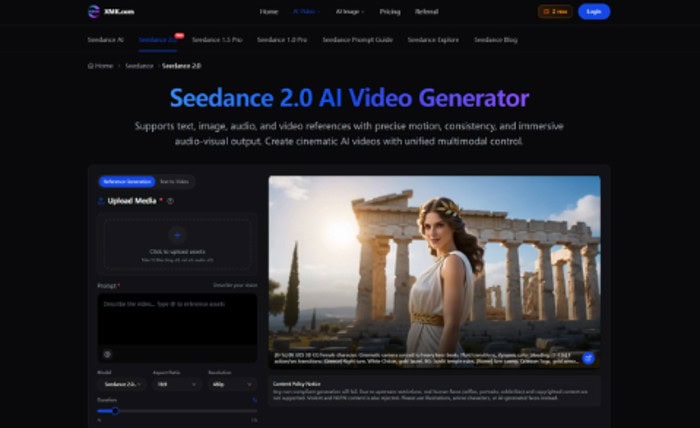
AI video tools are changing that, especially when they are treated as a creative layer rather than a full replacement for production. One example is Seedance 2.0, an AI video generator built around text, image, audio and video references. It gives users a way to turn existing assets into moving drafts with more control over motion, rhythm and visual consistency.
Why Small Teams Need Faster Video Drafts
The content workload for small online teams has grown quickly.
A single product launch may need a website banner, a short explainer, a social teaser, a founder post, a newsletter image and a few vertical clips. A coach may need visual content for a course, a podcast clip and a lead magnet. A creator selling digital products may need product demos, mood videos and short-form posts every week.
Hiring a video editor for every test idea is not always realistic. Spending hours in editing software for each social post is not always practical either.
This is where AI video can help. It can turn a product image, short script, reference clip or audio cue into an early draft. The draft may not be final, but it gives the creator something to review, improve or use as a starting point.
For solo teams, that first draft is often the missing piece.
The Better Way to Use AI Video
AI video works best when it starts with direction.
Typing a vague prompt and hoping for a perfect clip can lead to random results. A better workflow is to begin with existing creative material: a product image, brand asset, rough storyboard, voice note, short video reference or campaign idea.
Seedance 2.0 supports that kind of reference-based workflow. Users can upload images, audio or video assets, then explain how each one should guide the result. An image can act as a starting frame. A video can guide movement. Audio can shape rhythm. A prompt can describe lighting, camera movement, transitions and mood.
This makes an AI video generator more useful for people who already have assets but need motion. It turns AI video from a random generator into a practical drafting tool.
Turning One Idea Into Several Formats
Remote teams and independent creators often need to stretch one idea across several platforms.
A product announcement might become a LinkedIn post, a website section, an Instagram Reel and a short YouTube clip. A travel creator might turn one story into a blog intro, a visual teaser and a social caption. A SaaS founder might use one product screenshot to create a short feature preview.
AI video can help create those first visual variations.
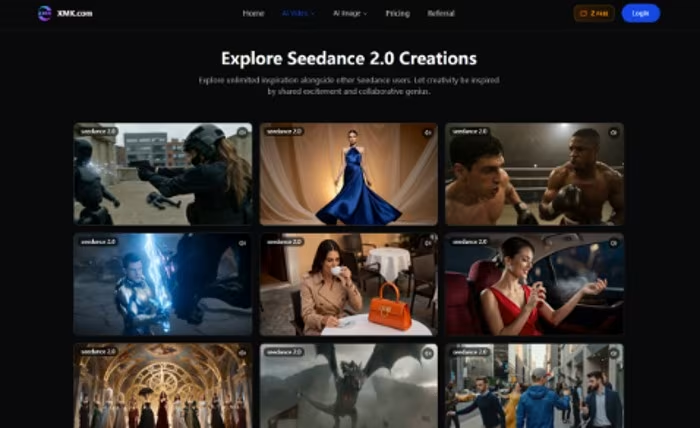
Seedance 2.0 supports different styles of content, including social media videos, marketing and advertising, brand campaigns and creative experimentation. Its page also describes features for extending existing clips, merging videos with transition logic and refining small segments without rebuilding the full project.
That matters because small teams rarely have time to start from zero every time.
Motion Helps Ideas Travel
Static images are useful, but motion often makes an idea easier to understand.
A product feature becomes clearer when it moves. A campaign idea feels more alive when the camera has direction. A brand mood becomes easier to judge when lighting, pacing and transitions are visible.
For digital nomads and remote creators, this can be especially helpful. They may be working from different locations, with limited gear or without a full creative team nearby. AI video can help bridge that gap by turning a rough idea into something visual enough to discuss.
The goal is not to publish every draft. The goal is to make decisions faster.
Where Seedance 2.0 Fits Best
Seedance 2.0 is most useful when a creator or team already has some direction.
For example:
- A founder has a product image and wants a short launch teaser.
- A creator has a moodboard and wants to test a visual style.
- A marketer has a short audio clip and wants a beat-matched social video.
- A remote team has a previous clip and wants to extend or refine it.
- A digital product seller wants a quick visual demo for a landing page.
These are everyday content problems. They do not always need a large production, but they do need enough control to avoid looking generic.
That is where cinematic AI video becomes useful. It helps creators move from static assets to motion without turning every idea into a full editing project.
A Simple Workflow for Lean Teams
A practical workflow can keep AI video from becoming a time sink:
- Start with one clear message.
- Choose the platform first, such as website, Reel, Shorts or LinkedIn.
- Upload approved images, audio or reference clips.
- Write a prompt that explains motion, camera style, lighting and pacing.
- Generate a short draft before trying a longer one.
- Review the result for clarity, consistency and brand fit.
- Refine only the strongest version.
This keeps the process focused. The tool creates options, but the creator still decides what is worth using.
Responsible Use Still Matters
Even for small teams, AI video should be reviewed carefully.
Creators should avoid uploading copyrighted material unless they have permission. They should also be careful with real human faces, celebrities or content that could mislead viewers. The Seedance 2.0 page includes a content policy notice explaining that non-compliant generation may fail and that real human faces, copyrighted content, violent material and NSFW content are restricted.
That is especially important for creators who publish across public platforms. A video can look polished and still create problems if the source material is not approved.
The Bigger Shift for Nomadic Creators
AI video is not removing the need for taste, editing or good ideas. It is making the early stage of video creation lighter.
For people working on the move, that can matter. A creator does not always have a studio. A founder does not always have a production team. A remote marketer does not always have time to wait for a full video cycle.
The strongest use of AI video is to make rough ideas visible sooner.
That gives small teams more room to test, compare and decide. It also helps them turn existing assets into content that feels more alive.
For solo founders, digital nomads and lightweight creative teams, Seedance 2.0 points to a practical future: not more content for the sake of volume, but faster drafts that help better ideas move.